天空飞手Sky Pilot

真机实践课使用的无人机Real drones in our hands-on classes

  • DJI Neo 2 小巧、有螺旋桨保护罩,适合第一次飞真机。Small, with guarded propellers. Great for a first real flight.
  • DJI Mini 系列DJI Mini series 带 GPS 悬停和避障的航拍无人机,游戏里的“普通”模式就是照着它设计的。A camera drone with GPS hover and obstacle sensing. The game's Normal mode is modelled on it.

先在模拟器里练好,再上手真机。Practise in the simulator first, then fly the real thing.

学会飞无人机,
也学会给它编程。
Fly a drone.
Then program it.

天空飞手是给孩子的 3D 无人机模拟器。先用摇杆在城市和雪山上自由飞行,再拼积木或写 Python,看无人机按你的程序起飞、转弯、拍照、送包裹。在模拟器里练好之后,课堂上再用 DJI Neo 2 和 DJI Mini 真机实践。 Sky Pilot is a 3D drone simulator for kids. Fly freely over a city and snowy mountains, then snap code blocks together or type Python and watch the drone take off, turn, take photos and deliver parcels exactly as programmed. Once they've practised here, students fly real DJI Neo 2 and DJI Mini drones in class.

65 个编程任务,25 个飞行关卡,2 张地图,可离线使用。 65 coding missions, 25 flight levels, 2 maps. Works offline.

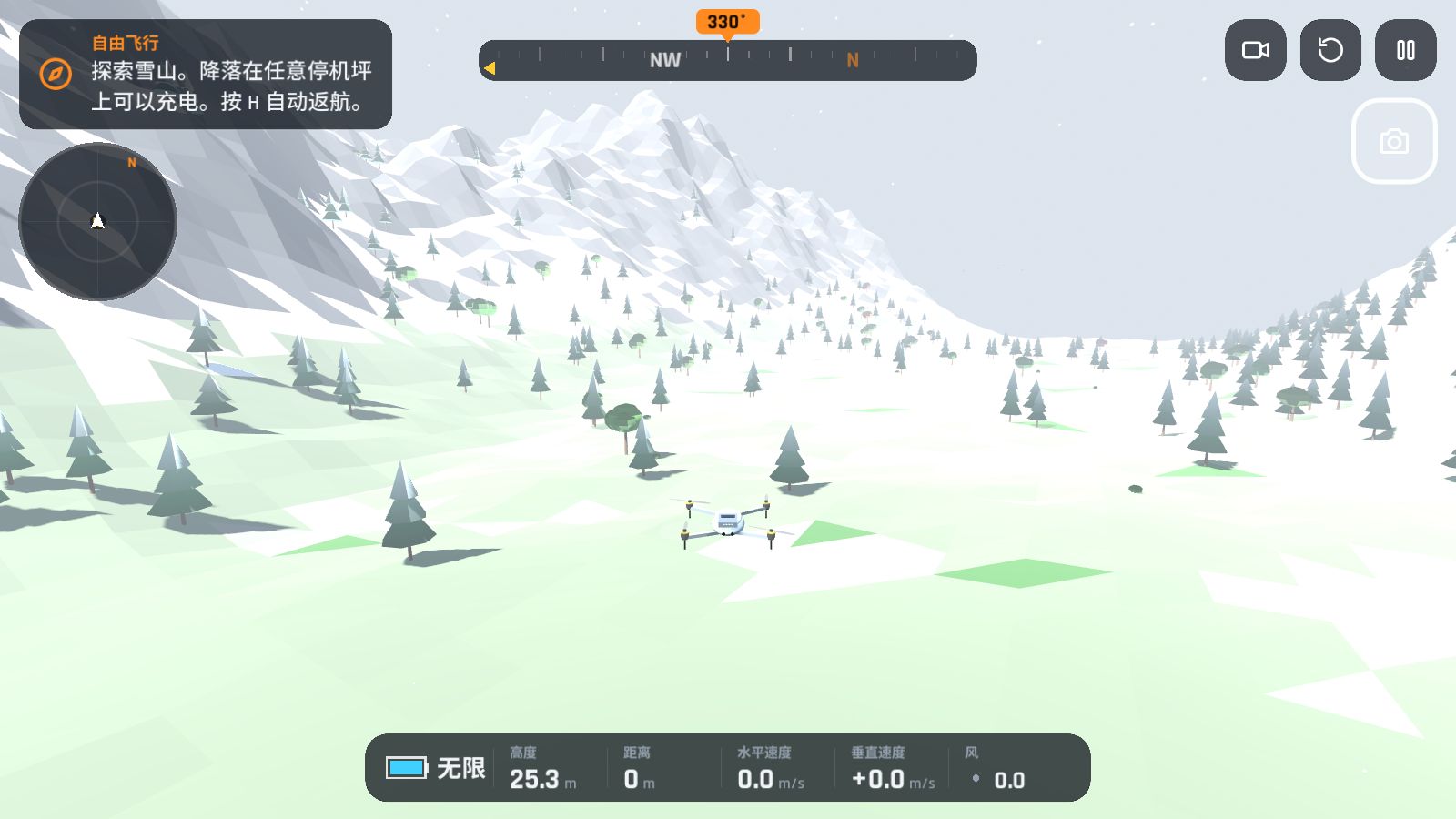
无人机飞过雪山 / The drone flying over the Snow Mountains

编程实验室Code Lab

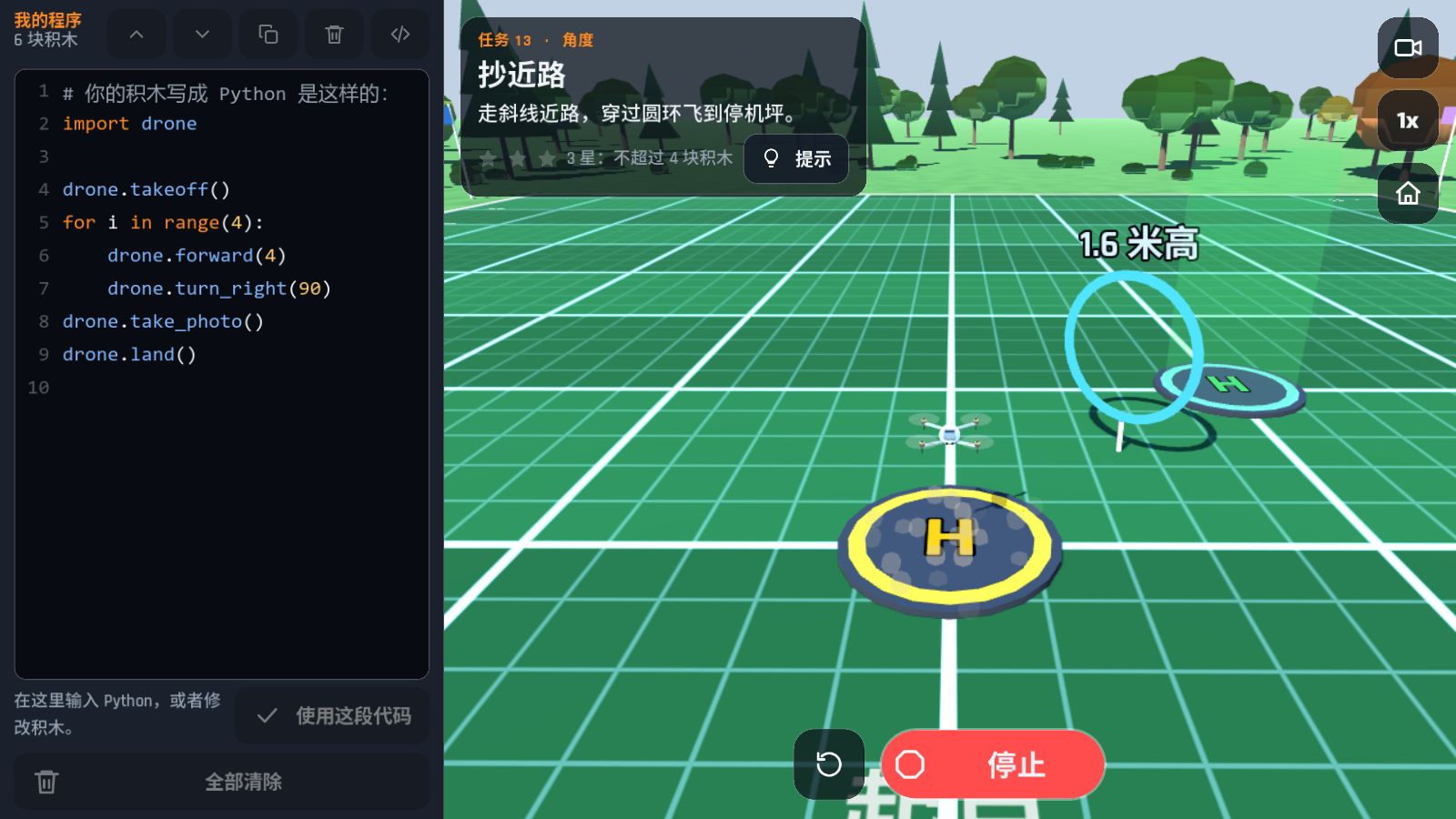
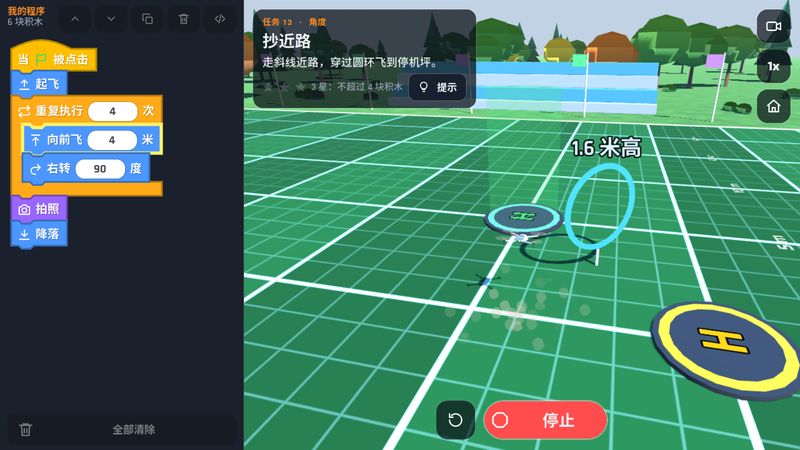
在 1 米一格的训练场上,用积木给无人机写程序:起飞、向前飞 4 米、右转 90 度……按下运行,正在执行的积木会亮起来。会了积木,再按 </> 直接写 Python。 On a training field marked in 1 m squares, kids program the drone with blocks: take off, fly forward 4 m, turn right 90°… Press RUN and each block lights up as it runs. Ready for more? Press </> and type the same program in Python.

  1. 当 ⚑ 被点击when ⚑ clicked
  2. 起飞take off
  3. 重复执行 4 次repeat 4 times
    1. 向前飞 4 米fly forward 4 m
    2. 右转 90 度turn right 90°
  4. 拍照take a photo
  5. 降落land

一条 20 周的学习路线A 20-week learning path

65 个任务一个接一个解锁,大约每周 3 个。用的积木越少,星星越多;第一次运行就成功,还能拿到“一次成功”奖章。65 missions unlock one after another, about 3 a week. Fewer blocks earn more stars, and solving a mission on the first run earns a first-try medal.

  1. 顺序和数字Sequence and numbers
  2. 转向和角度Turning and angles
  3. 循环画图形Loops and shapes
  4. 速度和时间Speed and time
  5. 嵌套循环Nested loops
  6. 传感器Sensors
  7. 如果 / 否则走迷宫If / else mazes
  8. 变量和函数Variables and functions
  9. 规划和送货Planning and deliveries
  10. 期末挑战Final Challenge

还有“任务制作器”:孩子自己摆放圆环、墙和停机坪,出题给同学解。Plus the Mission Maker: kids place rings, walls and landing pads to build missions for their classmates.

编程实验室里的 Python 视图 / Code Lab with the Python view open

像真的无人机一样飞Flies like a real drone

四种飞行模式,从不会坠毁的街机模式,到需要真本事的 FPV 手动模式。还有竞速和幽灵回放、25 个关卡、每日挑战,以及白天、黄昏、夜晚和雨雪雾天气。Four flight styles, from Arcade (it never crashes) to FPV Manual (it takes real skill). Plus races against your own ghost, 25 levels, a daily challenge, and day, sunset, night, rain, snow and fog.

飞行模式Flight styles
模式Style 感觉How it feels 速度Speed 难度Difficulty
街机Arcade 撞墙会弹开,永远不会坠毁,电池无限。最适合第一次玩。Bounces off walls, never crashes, unlimited battery. Best for a first flight. 速度Speed 难度Difficulty
普通Normal 像大疆航拍机:GPS 悬停、自动避障刹车、有风、有电池。Like a DJI camera drone: GPS hover, obstacle braking, wind and battery. 速度Speed 难度Difficulty
运动Sport 更快,惯性更大,没有避障刹车。Much faster, more momentum, no obstacle braking. 速度Speed 难度Difficulty
FPV 手动FPV Manual 没有 GPS 悬停,速度最快。可以开自稳帮助新手。No GPS hold and the highest speed. Self-levelling helps beginners. 速度Speed 难度Difficulty
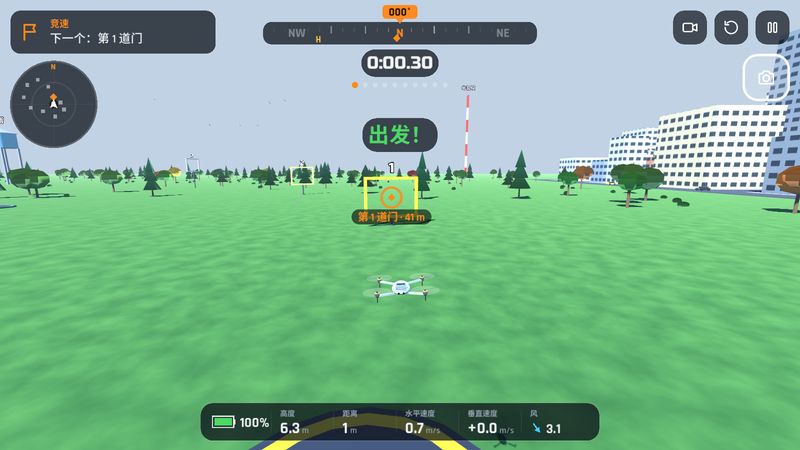
竞速:10 道门,和自己的幽灵比赛Race: 10 gates against your own ghost
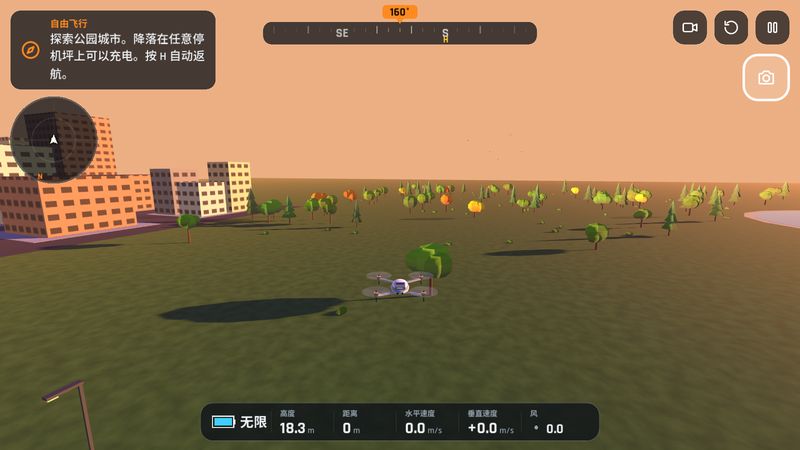
黄昏的公园城市Park City at sunset
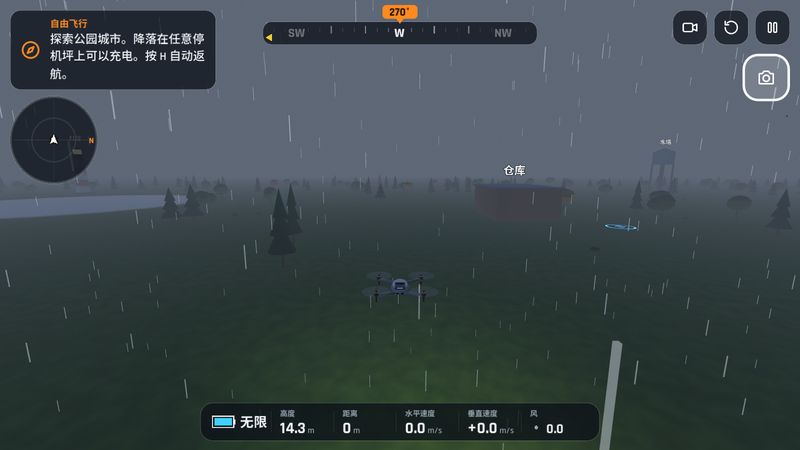
雨夜飞行Flying on a rainy night
编程实验室:程序运行中Code Lab: a program running
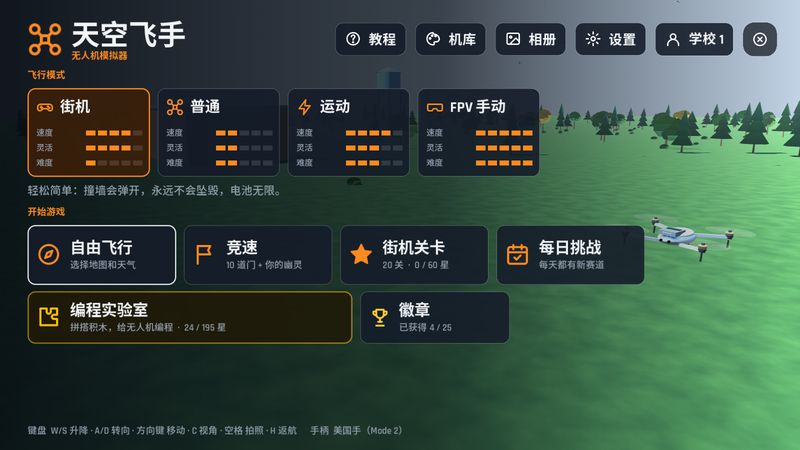
主菜单Main menu

为课堂设计Made for the classroom

每个班一个档案A profile for each class
每个学校或班级的星星、程序和记录分开保存,同一台平板可以给好几个班用。Each school or class keeps its own stars, programs and records, so one tablet can serve several classes.
班级进度表Class progress table
一眼看到每个班完成了哪些任务、卡在哪个任务。可以复制到 Excel、WPS 或者保存成 CSV。See which missions each class has finished and where they are stuck. Copy it into Excel or WPS, or save it as a CSV file.
教师密码Teacher PIN
设置密码后,学生不能切换、改名或删除班级档案。With a PIN, students can't switch, rename or delete class profiles.
不用网络No internet needed
安装后完全离线运行,不需要账号,没有广告。Runs fully offline after installing. No accounts, no ads.
中文和英文Chinese and English
默认简体中文,在设置里可以换成英文。Simplified Chinese by default, English in Settings.
进度不会丢Progress stays safe
自动备份存档,就算平板突然没电,班级进度也不会丢。Saves are backed up automatically, so a tablet running out of battery won't wipe a class's progress.

下载天空飞手Download Sky Pilot

版本 1.1,免费。更新时直接安装新版本,进度会保留。Version 1.1, free. To update, install the new version over the old one; progress is kept.

安卓平板和手机Android tablets and phones

下载 APKDownload APK 57 MB

2019 年以后的设备可以下载更小的Devices from 2019 on can use the smaller 64 位版本(32 MB)64-bit version (32 MB)。如果装不上,请用上面的版本。. If it won't install, use the one above.

  1. 用平板或手机打开这个网页,下载 APK。Open this page on the tablet or phone and download the APK.
  2. 打开下载的文件。如果提示“未知来源”,点“设置”,允许这个浏览器安装应用。Open the downloaded file. If it mentions unknown apps, tap Settings and allow this browser to install apps.
  3. 点“安装”,然后打开天空飞手。Tap Install, then open Sky Pilot.

需要 Android 7.0 或更新版本。Needs Android 7.0 or newer.

Windows 电脑Windows laptops and PCs

下载 Windows 版Download for Windows 82 MB (.zip)
  1. 下载 zip 文件。Download the zip file.
  2. 右键点它,选“全部解压缩”。Right-click it and choose Extract All.
  3. 打开解压出来的 SkyPilot 文件夹,双击 SkyPilot.exe。两个文件要放在一起。Open the extracted SkyPilot folder and double-click SkyPilot.exe. Keep both files together.

需要 64 位 Windows 10 或 11。键盘、手柄或触摸屏都可以玩。Needs 64-bit Windows 10 or 11. Play with a keyboard, a gamepad or a touchscreen.

iPhone 和 iPadiPhone and iPad

暂时还没有苹果版本。请用安卓平板或 Windows 电脑。There's no Apple version yet. Please use an Android tablet or a Windows computer.

所有版本和更新说明All versions and release notes